

Table of Contents
Table of contents
Someone asks for your logo “as a vector” and sends back a list of extensions you half recognise. Here is what each of the vector file formats actually is, and which to send.
The difference underneath
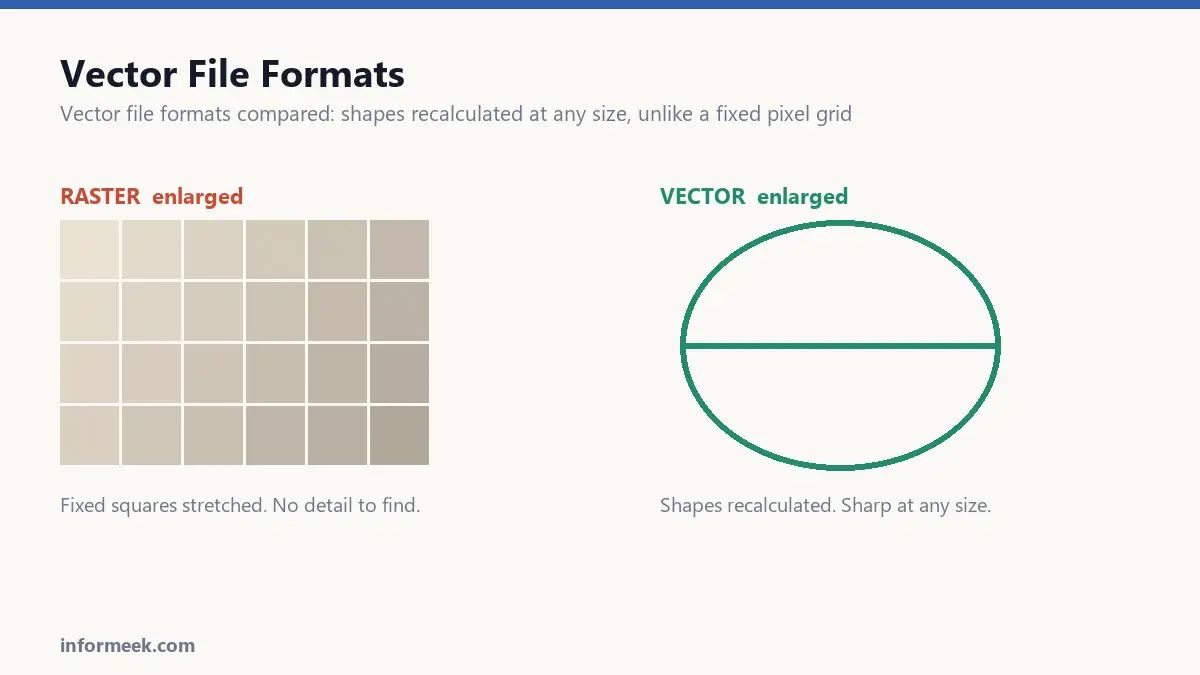
A raster image is a grid of coloured squares. A JPEG, a PNG, a photograph. Enlarge it and you are stretching a fixed number of squares, so you get blur and jagged edges. There is no extra detail to find, because none was ever recorded.
A vector image is a set of instructions. Not “these pixels are red” but “a circle of this radius, at this point, filled red”. To display it, the software works out the shape at whatever size is asked for.
So a vector has no resolution. The same file prints correctly on a business card and on the side of a building, because the shape is recalculated each time rather than stretched.
That is why printers ask for one, and why sending a PNG of your logo blown up to poster size produces a phone call.
Vector file formats and the formats
SVG is the web standard, and it is genuinely text underneath. You can open one in a text editor and read the shapes. It supports animation and CSS styling, and it is the correct format for a logo on a website. It is not a print format.
AI is Adobe Illustrator’s working file. It holds layers, editable text and everything else you need to keep changing the design. It is the master copy you archive, not the one you send around, because it needs Illustrator to open properly.
EPS is the old interchange format. Widely accepted, opens in most professional software, and still what many printers and embroiderers ask for by name. Largely superseded by PDF, but far from dead.
PDF is the safest thing to send a human. It holds vectors perfectly, opens on every device, and looks identical everywhere. If a printer has no preference, send a PDF.
One thing that confuses everyone: a PDF is not automatically a vector. A PDF can contain vectors, or it can contain a photograph of a logo. The wrapper says nothing about the contents. Zoom in a long way; if the edges go soft, what is inside is raster.
What to send, to whom
- A printer: PDF, or EPS if they ask. Fonts outlined.
- A web developer: SVG.
- Embroidery or signage: EPS or AI. Ask first, these trades have strong preferences.
- A colleague making a slide: PNG with a transparent background. They do not want a vector and cannot open one.
- Your own archive: the AI or original working file, backed up somewhere you will still have it in five years.
Outline your fonts
The single most common reason vector artwork arrives wrong.
A vector file referencing a typeface needs that typeface installed to render. Your printer does not have your fonts, so the file opens with a substitute, and your carefully spaced wordmark comes out in something else entirely.
Converting text to outlines turns the letters into plain shapes. They no longer need the font, and they can no longer be edited as text, which is why you do this on the copy you send and never on your master.
Vector is not always right
Photographs cannot be vectors in any useful sense. A photo is millions of subtly different pixels, and describing that as shapes produces an enormous file that looks worse than the original.
Vector suits flat shapes with defined edges: logos, icons, type, diagrams, illustration. Raster suits anything continuous and photographic.
Automatic tracing tools promise to convert a photo to vector. What they produce is a pile of odd-shaped blobs that is technically vector and practically unusable.
If all you have is a JPEG
This happens constantly with older logos where the original file is long gone.
It has to be redrawn. Tracing gets you close for simple shapes but leaves wobbly curves that look fine small and obvious large. For a logo you will use for years, paying someone to rebuild it properly is a one-off cost that stops the problem recurring forever.
How to tell what you actually have
File extensions lie, so test rather than trust.
Open the file and zoom to 1600%. Vector edges stay perfectly crisp at any magnification because the shape is recalculated. Raster edges go soft and then blocky, because you are enlarging a fixed grid.
This matters most for PDFs, which are frequently a photograph of a logo wrapped in a PDF container. The wrapper tells you nothing about the contents.
A second check: try to select an individual shape. In a genuine vector you can click a single element and see its anchor points. In a raster you select the whole rectangle.
Mistakes that waste time
- Sending a working file instead of an export. An AI file with live text opens wrong on a machine without your fonts.
- Outlining fonts on the master. Do it on the copy you send. Outlined text can never be edited again.
- Auto-tracing a photograph. It produces thousands of odd blobs that are technically vector and practically unusable.
- Assuming SVG is a print format. It is the web standard. Printers want PDF or EPS.
- Losing the original. The most expensive mistake here, and the most common. Archive the master somewhere you will still have access in five years.
Common questions
Can a photograph be converted to vector? Not usefully. A photograph is millions of subtly varying pixels, and describing that as shapes produces an enormous file that looks worse than the original. Vector suits flat shapes with defined edges.
Which format should I ask a designer for? All of them: the editable master, a PDF with outlined fonts, an SVG, and PNGs in a couple of sizes. Ask before work starts, because retrieving them afterwards often costs extra.
Is SVG safe to put on a website? Yes, and it is the right choice for logos and icons. One caution: SVG can contain scripts, so only upload files from sources you trust, and many content systems restrict SVG upload for exactly that reason.
Why does my vector logo look blurry on the website? Almost always because a PNG is being served rather than the SVG, or the SVG is being scaled by the browser from a fixed pixel size. Check what the page is actually loading.
Related reading
Continue with Brand Identity Elements, Logo File Formats, Print Resolution. For the underlying standard, see the W3C SVG 2 specification.

Join the discussion